Is that link phishing? Meet the StalkPhish URL scanner (closed beta)
A link arrives by SMS, e-mail or chat, and someone has to decide quickly whether it is phishing. Opening it in a browser is risky and often useless: today’s phishing pages are protected by traffic filters that show the real page to the targeted victim and something harmless to everyone else, starting with security analysts and their tools.
That is the problem the StalkPhish URL scanner was built for. It is powered by the same detection engine as StalkPhish.io, our phishing detection and investigation platform, and it has been open to a first group of testers since September. It is still in closed beta: if you want to try it, ask us for an access code.
In short:
- Paste a suspicious URL, even defanged, and get a threat score from 0 to 100 and a verdict in seconds.
- The scanner follows the whole redirect chain, renders the page in a real browser and keeps a screenshot, from isolated infrastructure.
- It detects cloaking: when scammers hide their page from analysts, the hiding itself becomes evidence.
- Every score comes with the signals that justify it and the forensic data needed for a takedown.
- A JSON API lets SOC, CERT and anti-fraud teams plug it into their own tools.
To show what it does, here is a real result, section by section: a link that looks like nothing, and turns out to be a well-hidden phishing route.
The verdict first: a score out of 100
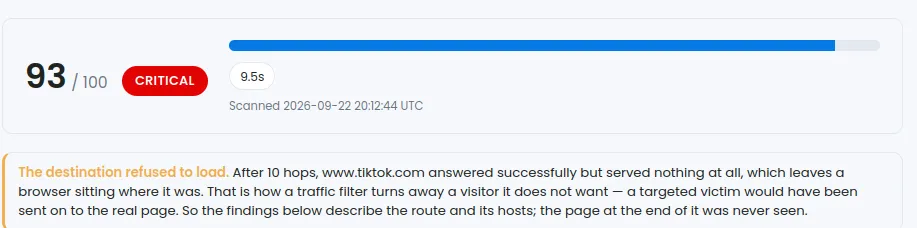
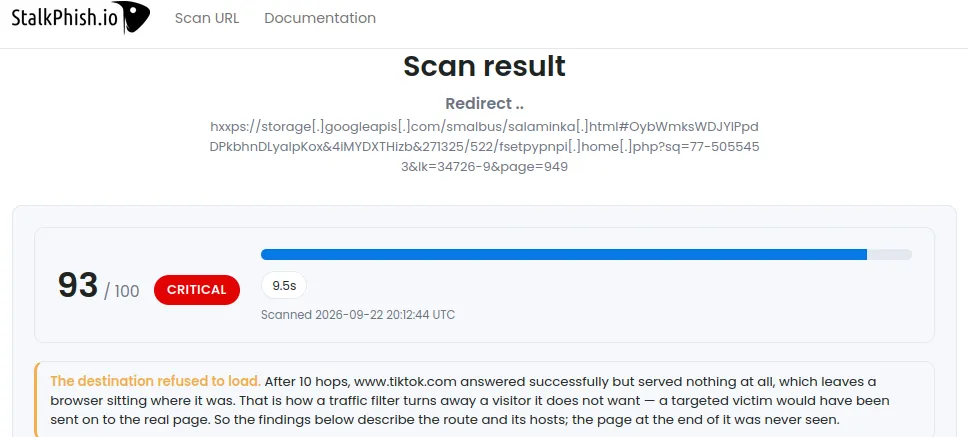
Every scan ends with a threat score from 0 to 100 and a verdict, from VERY LOW to CRITICAL. A higher score means more evidence of phishing, not more trust. This one scored 93/100, CRITICAL, in less than ten seconds.
Just below, the scanner says plainly what it could and could not see. Here, after 10 hops, the destination answered but served nothing: that is how a traffic filter turns away a visitor it does not want. A targeted victim would have been sent to the real page. The scanner does not pretend otherwise: its findings describe the route and its hosts, and it says so.
This honesty matters. A low score on a page that could not be reached means “nothing was examined”, not “nothing is wrong”, and the report makes the difference visible.
What the browser saw
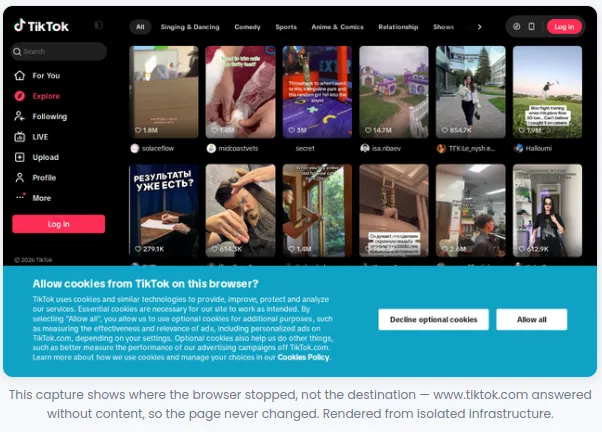
The scanner renders each page in a real browser and keeps a screenshot, taken from isolated infrastructure: neither your browser nor your IP address ever touch the suspicious site. Here, the capture shows TikTok, which is exactly the point: this is where the scammers’ filter chose to send a visitor it had identified as an analyst.
The decoy: anti-analysis cloaking
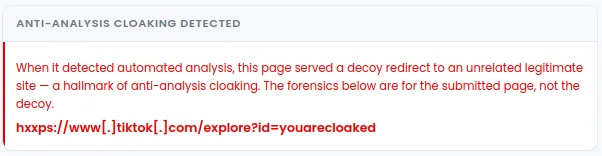
Instead of the phishing page, the chain ended on tiktok.com/explore?id=youarecloaked. The scammers did not even hide it: you are cloaked. This decoy redirect to an unrelated, perfectly legitimate site is a hallmark of anti-analysis cloaking, and the scanner treats it as what it is: evidence, not a dead end. A legitimate link has no reason to send automated visitors somewhere else.
Following the whole route
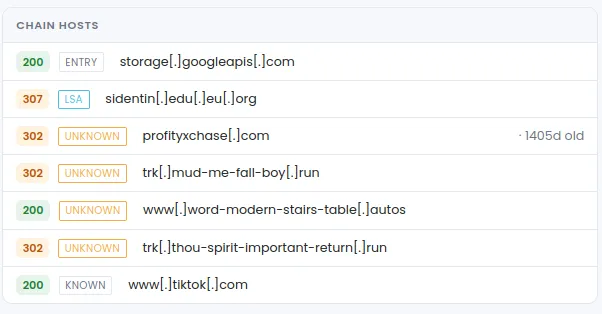
The link started on a bucket hosted on Google Cloud Storage, a trusted platform that scammers like precisely because its reputation is excellent. From there, the visitor was passed from host to host:
- a free subdomain of a public domain service;
- a domain registered almost four years earlier, recycled as a relay;
- tracking domains with random word combinations on recent TLDs such as
.runand.autos, typical of a traffic distribution system (TDS); - and finally the decoy.
Each host is labelled: the entry point, known legitimate sites, and unknown hosts that have no reason to sit in the middle of a redirection.
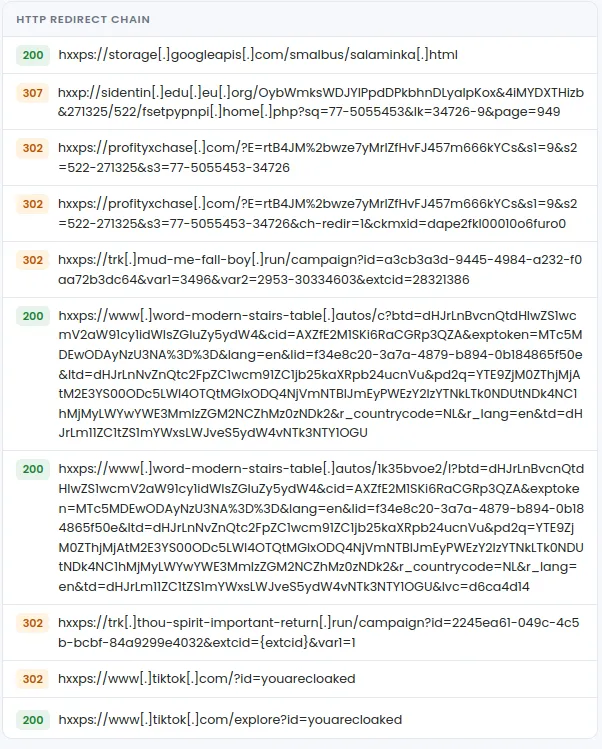
The complete HTTP redirect chain is kept, hop by hop, with the status code of each answer. Every hostile URL is defanged (hxxps://…[.]com) so it cannot be clicked by accident when the report is shared in a ticket or a chat.
Reading the scammers’ parameters
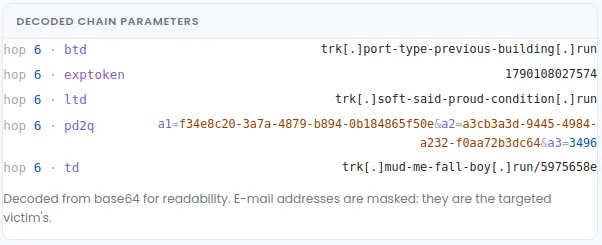
Traffic distribution systems pass information from one hop to the next in their URLs, often encoded in base64. The scanner decodes these parameters for readability: other tracking domains of the same network, campaign identifiers, timestamps. These are valuable leads to find the rest of the infrastructure. When a parameter contains an e-mail address, it is masked: it is the address of the targeted victim.
The detections, explained
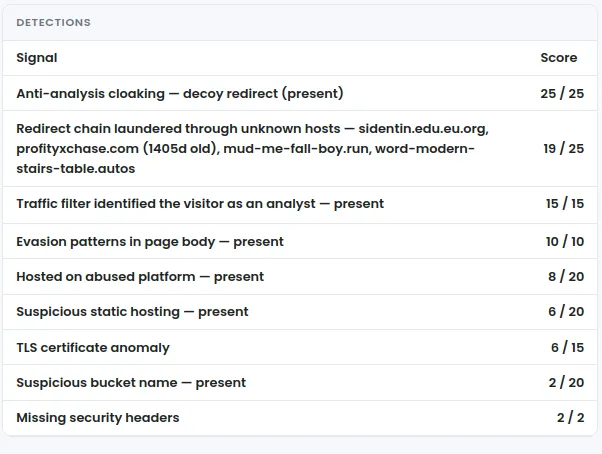
The score is not a black box: the report lists the signals that fired, each with its share of the score. In this case: the decoy redirect, a chain laundered through unknown hosts, a traffic filter that identified the visitor as an analyst, evasion patterns in the page, hosting on an abused platform, a TLS certificate anomaly…
Behind these labels is the engine of StalkPhish.io, the one that also identifies the phishing kit family of each kit we collect. The labels are deliberately generic. We explain what was found, not exactly how we find it: phishing kit developers read our reports too.
The forensic data, in one place
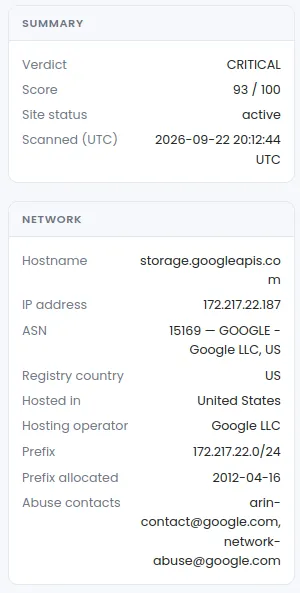
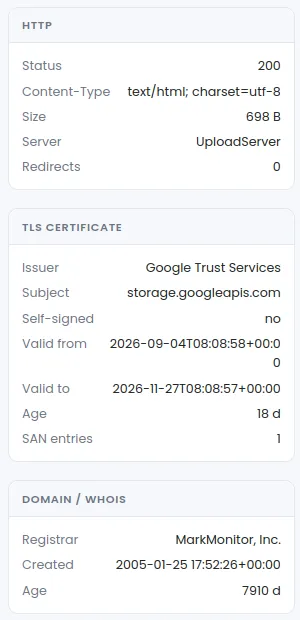
For the analyst who has to go further, file an abuse report or request a takedown, the scanner gathers the forensic metadata of the scanned host: IP address, ASN and hosting operator, abuse contacts, HTTP answer, TLS certificate (issuer, validity, age), domain registration and age. When the IP address or the host is already known in the StalkPhish.io threat intelligence, the report says so.
Here, the WHOIS and the certificate belong to Google: the entry point is a legitimate platform, and this is exactly why reputation alone would have let this link through.
Built for analysts, and for their tools
- Web app: paste a URL, defanged or not, and follow the scan live, from DNS resolution to page rendering.
- JSON API: everything the web app does is available through a documented REST API (OpenAPI / Swagger), to plug the scanner into a SOAR, a ticketing tool or an abuse mailbox.
- Isolation: the target is never fetched from your browser or your network.
- Shareable results: each result has its own link, not indexed by search engines, with a limited lifetime.
- Feedback built in: a verdict looks wrong? The “Report a false positive or issue” button attaches the exact scan, so we can reproduce it and tune the engine.
Results come from automated tests: they are informational and do not replace a human verdict.
Join the beta
The scanner is invite-only during the beta. Each tester gets a personal access code, usable in the web app and with the API, with a daily quota.
We are especially looking for SOC, CERT and CSIRT teams, anti-fraud and brand protection teams, and anyone who handles suspicious links every day and is willing to tell us when the scanner is wrong. Every report from our testers has already led to a change in the engine.
👉 Contact us to request your access code, telling us a few words about who you are and how you would use the scanner.
Frequently asked questions
How can I check whether a link is phishing without opening it?
Submit it to a URL scanner that analyses it from isolated infrastructure. The StalkPhish URL scanner follows every redirect, renders the page in a real browser and returns a score from 0 to 100 with the signals behind it. Your browser and your IP address never touch the suspicious site.
What is anti-analysis cloaking?
A technique where a phishing site shows its real page only to the targeted victims, and sends security tools, crawlers and analysts to a harmless decoy, often a well-known legitimate site. Detecting that decoy is itself evidence of phishing.
What is a traffic distribution system (TDS)?
A chain of redirection servers that decides, hop by hop, where to send each visitor, depending on criteria such as country, device or IP reputation. Scammers use it to filter their victims and hide the final phishing page.
Why do phishing links start on Google Cloud Storage or other trusted platforms?
Because these platforms have an excellent reputation, so a link hosted there passes many filters. That is why the StalkPhish URL scanner judges the whole route, not only the reputation of the first host.
How do I get access to the StalkPhish URL scanner?
During the beta the scanner is invite-only. Request a personal access code through the StalkPhish contact page (stalkphish.com/contact/). The code works in the web app and with the JSON API.